One upload in. Your viral video out. Unlimited rewards await.
WIN iPHONE DUO
Capture a city in one minute. Join the challenge now.
Pollo MCP
End-to-end content creation. Up to 4 Videos/ 20 Images for FREE.
Get Unlimited GPT Image 2.5
Faster. Sharper. Smarter. Go Unlimited with Ultra.
Unlock Unlimited MiniMax H3
Omni-Reference. Unlimited with Ultra.
Get Unlimited Wan 3.0
Native 30-second videos. Richer reference inputs.
Discover Veo 3’s Endless Possibilities
Key Features of Veo 3
Native Audio Generation: Create and integrate audio into the videos it produces
Produce Viral-ready Content: Create entertaining “fake news” videos or time-travel clips that help you earn likes
Advanced Prompt Understanding: Interpret complex prompts with high accuracy
Reference to Video and Consistent Characters: Create character consistent videos based on references
Accurate Style Control: Control the artistic style based on reference images
Camera Controls: Create videos with specific camera movements
First and Last Frames: Generate seamless videos between two uploaded images
Add and Remove Objects: Add or erase objects within a video scene
Flexible Motion Control: Customize the movements of video objects
Integration with Flow: Create videos with Google’s new AI filmmaking tool
Native Audio Generation
Veo 3 can create and integrate audio directly into the videos it produces, including sound effects, ambient noises, and character dialogue with synchronized lip-syncing. This makes the AI videos more immersive and realistic, and you do not have to treat audio as a separate step.
Prompt
Output video
In rural Ireland, circa 1860s, two women, their long, modest dresses of homespun fabric whipping gently in the strong coastal wind, walk with determined strides across a windswept cliff top. The ground is carpeted with hardy wildflowers in muted hues. They move steadily towards the precipitous edge, where the vast, turbulent grey-green ocean roars and crashes against the sheer rock face far below, sending plumes of white spray into the air.
A keyboard whose keys are made of different types of candy. Typing makes sweet, crunchy sounds. Audio: Crunchy, sugary typing sounds, delighted giggles.
A snow-covered plain of iridescent moon-dust under twilight skies. Thirty-foot crystalline flowers bloom, refracting light into slow-moving rainbows. A fur-cloaked figure walks between these colossal blossoms, leaving the only footprints in untouched dust.
Produce Viral-ready Content
Create scroll-stopping viral videos in minutes. Veo 3 lets you craft entertaining “fake news” and time-travel, historical videos, or even animal talking videos with perfect audio-visual sync and cinematic quality. Grab likes and shares effortlessly.
Viral concepts
Generated video
"Fake news"
Time travel/historical videos
Animal talking
Advanced Prompt Understanding
Veo 3 can interpret complex, narrative-driven prompts with high accuracy. Users can describe detailed scenes, character actions, and story elements in everyday language, and the model translates these into cohesive video clips.
Prompt
Output video
A fast-tracking shot through a futuristic city with buildings made from reflective organic chrome. It is daytime, rainbows fill the sky, and an alien planet looms above. The camera zooms in on a robotic bee working inside a reflective organic chrome structure.
A paper boat sets sail in a rain-filled gutter. It navigates the current with unexpected grace. It voyages into a storm drain, continuing its journey to unknown waters.
Reference to Video and Consistent Characters
Veo 3 supports reference-powered video generation, allowing users to provide images of characters, scenes, objects, or artistic styles as visual anchors for the AI. This ensures that characters and elements remain visually consistent across multiple clips or scenes.
Input
Output video
Accurate Style Control
By using reference images or style prompts, Veo 3 lets creators control the artistic style of the video output. Whether you want a photorealistic look, a cartoonish animation, or a particular cinematic style, you can guide the AI’s rendering to match your vision by uploading a style reference image.
Input
Output video
Camera Controls
Veo 3, especially integrated within Flow, offers advanced camera manipulation features. Users can specify camera movements such as pans, zooms, and angle changes. This enables filmmakers to craft cinematic shots with dynamic perspectives and smooth transitions, enhancing the storytelling impact.
Camera movement
Output video
Pan
Zoom
First and Last Frames
Veo 3 can generate seamless video content between two uploaded frames. This ensures smooth transitions and continuity from the first to last frames of a sequence, which is essential for coherent storytelling.
Input
Output video
Add and Remove Objects
Veo 3 includes powerful object manipulation capabilities. Users can add or erase objects within a video scene, and the AI understands the scale, shadows, and interactions of these objects with the environment. This means you can modify a generated video by inserting new props or removing unwanted elements while maintaining a natural, realistic look.
Input video
Output video
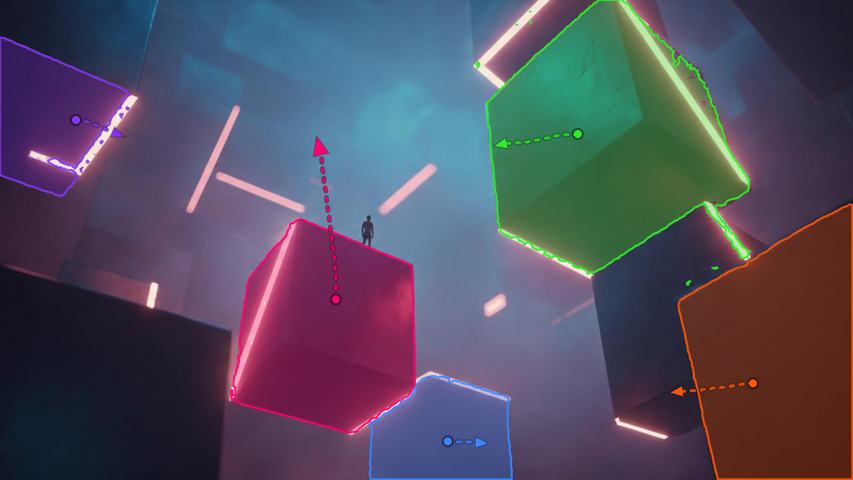
Flexible Motion Control
Veo 3 excels at producing realistic and consistent motion. It allows you to specify movements of the objects in your video, and they will move naturally and interact believably. You can use this to produce fluid character animation, and coherent movement of environmental elements like fabric or water.
Input
Output video
Integration with Flow
Veo 3 works with Google’s new AI filmmaking tool called Flow, which enables users to create cinematic videos by specifying locations, shots, and styles. Flow combines Veo 3 with Imagen 4 and the Gemini AI model to streamline video production workflows.
Built for Short Videos That Need Sound
Talking Character Clips: Create short story scenes where characters speak, react, or perform with synced dialogue and matching ambience.
SaaS Demo Shorts: Turn a SaaS idea into a quick demo clip with realistic motion, sound effects, and cinematic framing.
Brand Mood Films: Generate premium visual concepts for campaigns, pitch decks, launch videos, and creative direction.
Explainer Snippets: Show a simple process, feature, or concept with clear motion, natural pacing, and built-in audio.
Comedy and Skit Videos: Make short dialogue-driven scenes, parody clips, or character moments that feel more complete with voice and sound.
Atmospheric Story Scenes: Create fantasy, sci-fi, realistic, or historical scenes where environmental sound helps carry the mood.
I’ve been using Pollo AI mainly for short videos and quick image-to-video tests. The interface is straightforward and it works well even with simple prompts, which is a big plus compared to tools that need long, complicated instructions. The results can be really impressive, and it’s honestly been fun to experiment with. I’d love a bit more consistency on faces when there’s movement, but overall it’s been a solid experience for what I needed.
Awesome website. loads of options and a great way to learn how to work with 'AI' my reasoning for 5 stars is based upon price, versatility and ease of use. Also I would like to add, Pollo AI runs a lot of promos on different AI products as well. I rate their customer service at 5 stars, when I purchased my first subscription my computer crashed the following weekend and I lost all my data and info passwords you name it I lost it, contacted pollo by email they responded quickly and found my info/username and account, and I was able to restore my account.
I have been using Pollo AI for short videos. It is easy to use and works well with simple prompts. Other generators seem to need long drawn out complicated explanations to get even close to what I want.
i tried 220 online img to vid in 2 months, and this is the best online video.I will subscribe for a year; there are many reasons. But freedom is the most important.
Helpful Articles About Veo 3
Read our insightful articles about Veo 3 and learn more about its features, benefits, use cases, and more!
Veo 3 is Google DeepMind's latest AI video generation model that can create high-quality videos from text or image prompts, with enhanced character consistency, style and camera control. Read our review of Veo 3 to know our personal experience with this model.
How does Veo 3 differ from its predecessor Veo 2?
Unlike Veo 2, Veo 3 generates native audio along with video, offers improved video quality with realistic physics, better lip-syncing, and enhanced understanding of complex narrative prompts.
What platforms provide access to Veo 3?
You can now try Google Veo 3 model in Pollo AI for free. Since Pollo AI has integrated Veo 3, you can create videos from text prompts using Pollo AI text to video AI with the same Google model. Developers can also use the Veo 3 API on Pollo API to integrate text-to-video and image-to-video generation into apps, platforms, and automated workflows.
How does Google ensure ethical use of Veo 3-generated content?
All Veo 3 videos include invisible SynthID watermarks that identify the content as AI-generated, helping combat misinformation and promote transparency.
Get Started with Google Veo 3 on Pollo AI Now!
Use Veo 3 to create viral-ready videos with realistic, natural audio from text prompts or image references.






 Liz Cassidy